Manage Every Retailer Account and Order in One Place.
Zinc Manager gives you a simple control center to manage retailer accounts, search products, create orders, save addresses, monitor API activity, and keep your entire Zinc workflow organized.
Environment
128
Managed Accounts
23
Orders in Progress
342
Orders Placed
1,284
API Calls Today
12
API Failures
Recent Orders
 #ORD-2506
Order Placed
$129.99
#ORD-2506
Order Placed
$129.99
 #ORD-2504
In Progress
$89.50
#ORD-2504
In Progress
$89.50
 #ORD-2503
Order Placed
$45.00
#ORD-2503
Order Placed
$45.00
 #ORD-2502
Order Failed
$199.99
#ORD-2502
Order Failed
$199.99
 #ORD-2501
In Progress
$75.20
#ORD-2501
In Progress
$75.20
View all orders →
Recent API Activity
View all logs →
Accounts by Status
API Usage (Today)
1,284 / 10,000 calls
12.8% used
Trusted by operators who work with:
Everything you need to stay organized
Powerful features designed to simplify complex retailer operations.
Manage Accounts
Organize retailer accounts with groups, labels, and status management.
Create Orders
Place single or bulk orders with a simple step-by-step flow.
Search Products
Find products across retailers and compare prices instantly.
Address Book
Save addresses once and use them across all your orders.
API Logs
Monitor API requests, responses, and failures in real time.
Live & Sandbox
Work confidently with separate Live and Sandbox environments.
From API connection to order management in a few simple steps
Connect
Connect your Zinc API credentials securely.
Add Accounts
Add and organize your retailer accounts.
Save Your Setup
Create reusable addresses, groups, and labels.
Search & Order
Search products and create single or bulk orders.
Monitor
Track orders, activity, API logs, and performance.
Retailer management should not be complicated.
As operations grow, teams end up managing multiple retailer accounts manually, switching between accounts, tracking orders across retailers, re-entering shipping addresses, and digging through API logs to understand what went wrong.
Before Zinc Manager
- Multiple retailer accounts managed manually
- Switching between accounts to place orders
- Tracking orders across retailers in spreadsheets
- Re-entering shipping addresses every time
- Managing product URLs and searches by hand
- Digging through raw API logs to find failures
- Confusing Live and Sandbox environments
With Zinc Manager
- Every retailer account organized in one workspace
- One guided workflow to create any order
- Full order visibility with statuses and tracking
- Saved addresses, ready to reuse instantly
- Built-in product search across retailers
- Clear, searchable API logs with request detail
- Live and Sandbox kept completely separate
Zinc Manager brings these workflows together into one simple system.
Manage all your retailer accounts from one workspace.
Connect and organize your retailer accounts without losing visibility as your operation grows.
Explore Managed Accounts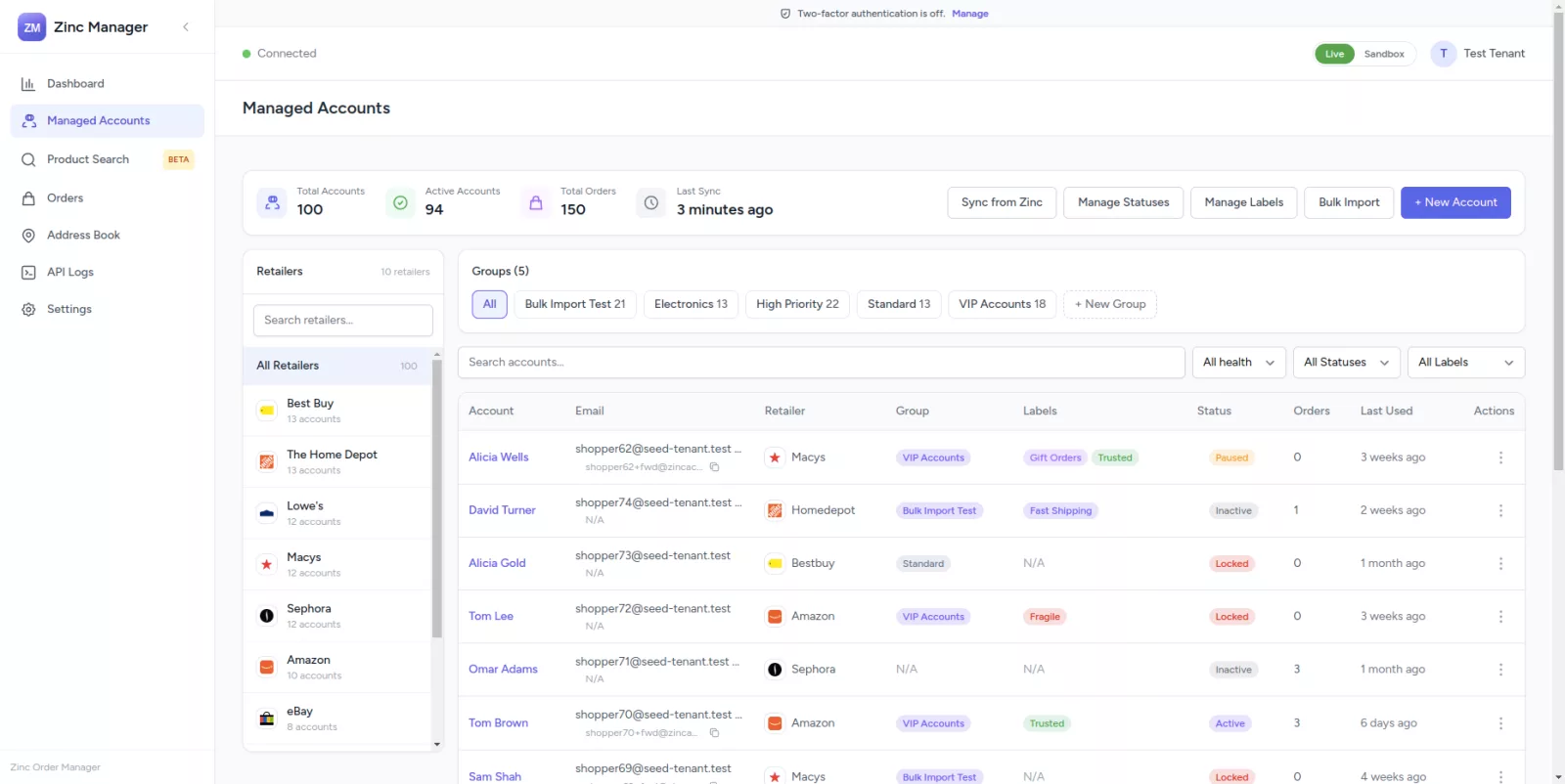
Retailer-wise Management
See all accounts belonging to a specific retailer in one place.
Group Organization
Create groups such as VIP Accounts, High Priority, Electronics, or custom operational groups.
Labels
Use flexible labels to categorize accounts your way.
Status Management
Quickly identify active, inactive, paused, or other account states.
Account Activity
Understand when an account was last used and how many orders it has processed.
Choose exactly how your order should be placed.
Use one of your own Managed Accounts, or let a Zinc-Pooled Account handle retailer selection for you.
Place this same order on multiple accounts
Switch into bulk mode to select more than one account.
Filter accounts by
3 accounts selected × 1 product → 3 orders will be created
24 Accounts Available
3 Selected
John Smith
Sarah Gold
Sam Jones
John Smith
Sarah Gold
Sam Jones
Priya Patel
Miguel Ruiz
One order setup. Multiple account targets.
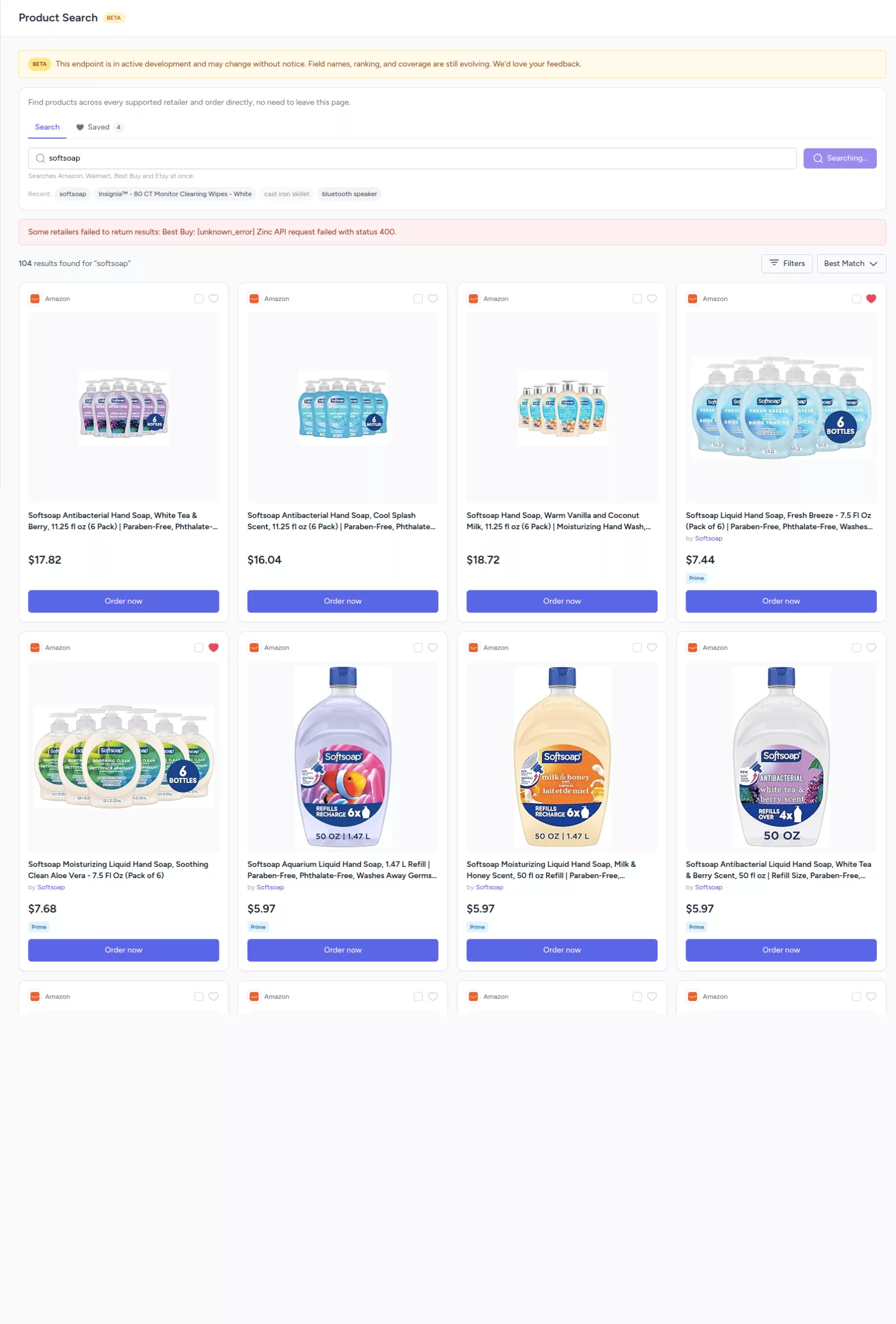
Search products without leaving your workflow.
Search for products and view results from multiple retailers, side by side. Zinc Manager gracefully handles incomplete data, if a brand, rating, or availability isn't provided, that field is simply left out rather than shown broken.
Find the product you need, compare available results, and move directly into the order workflow.
Search ProductsCreate orders with a simple guided workflow.
Complex order creation, broken into simple steps.
Account
Choose a Managed Account or Zinc-Pooled Account.
Products
Search for products or add product URLs.
Shipping
Choose a saved address or add a new one.
Options
Configure available order preferences.
Review
Review everything before creating the order.
Every order, easy to find and easy to understand.
Search by order ID, purchase order number, or merchant order ID. Filter by status, retailer, account type, or date. Failed orders surface useful error information, like “Payment verification required” or “Invalid product URL”, so operational issues are easy to identify.
Explore Orders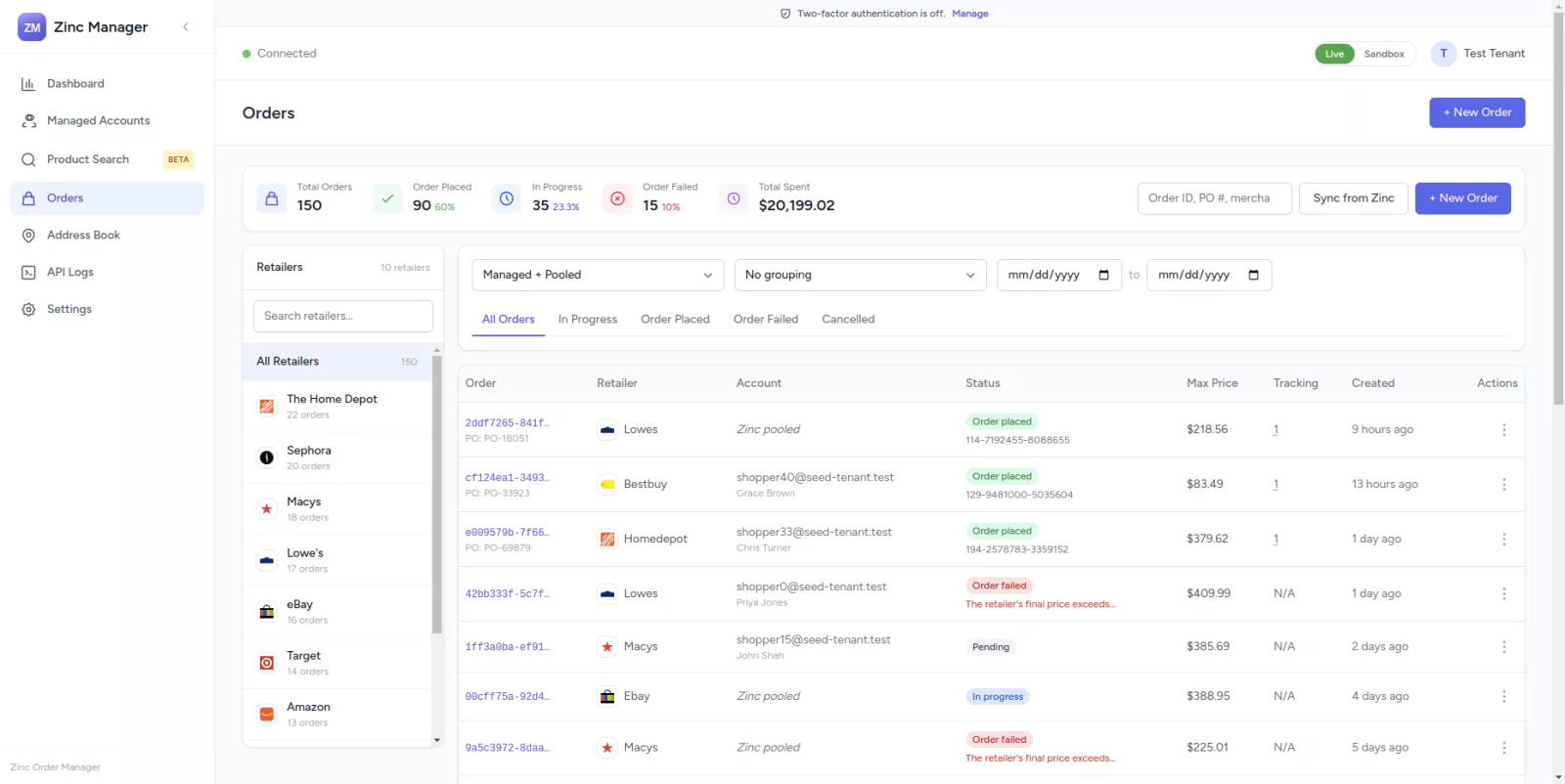
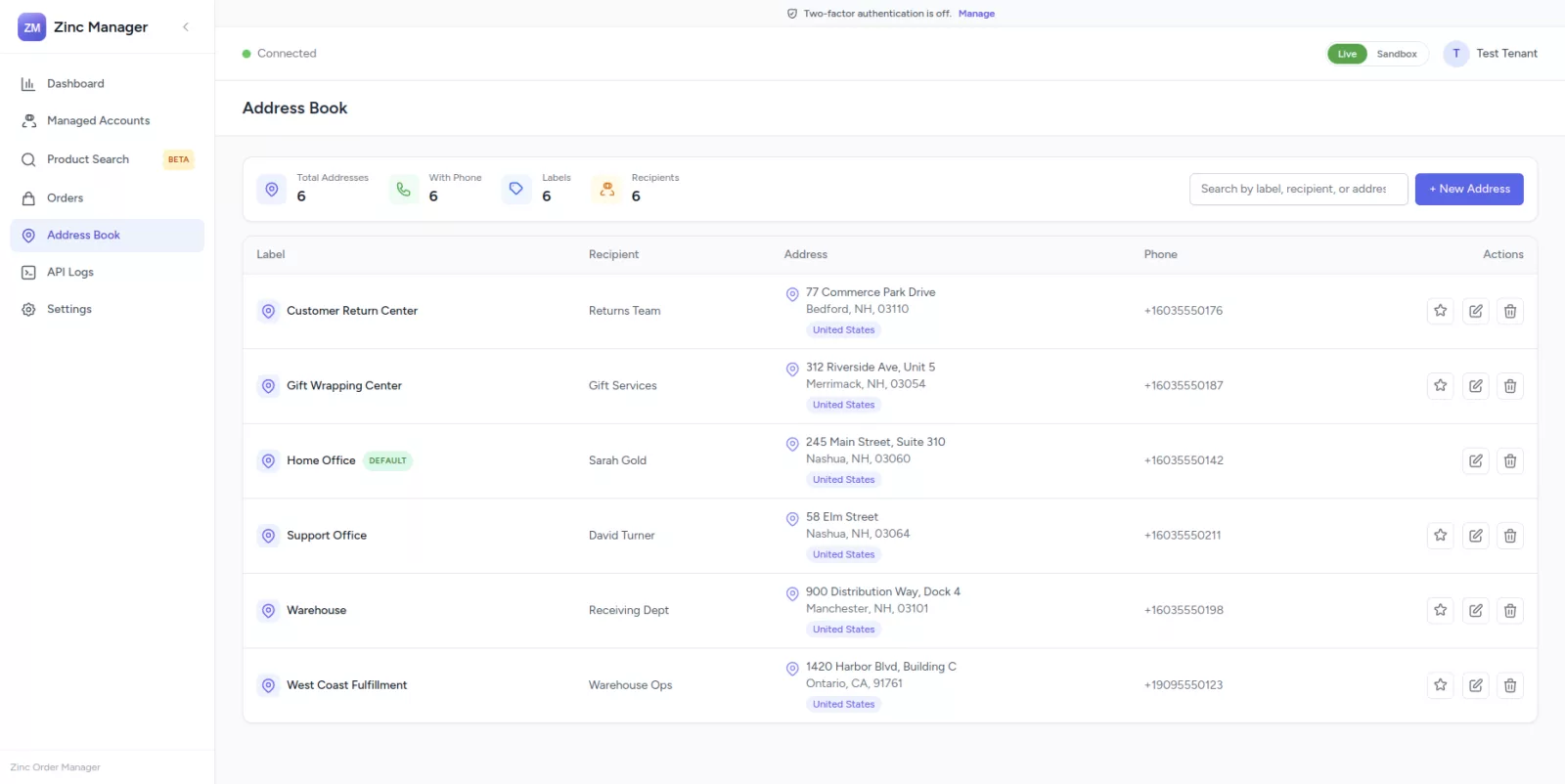
Add an address once. Use it whenever you need it.
Save frequently used addresses with a label, recipient information, and phone number. Edit or delete them anytime, and select any saved address directly during order creation.
Explore Address BookCreate it once. Reuse it across your orders.
See what is happening behind the scenes.
Every request and response is logged with its endpoint, context, status code, and duration. Search by endpoint, error code, or message, then expand any entry to see the full request and response payload.
Find failures faster and understand your API activity without digging through external logs.
Explore API Logs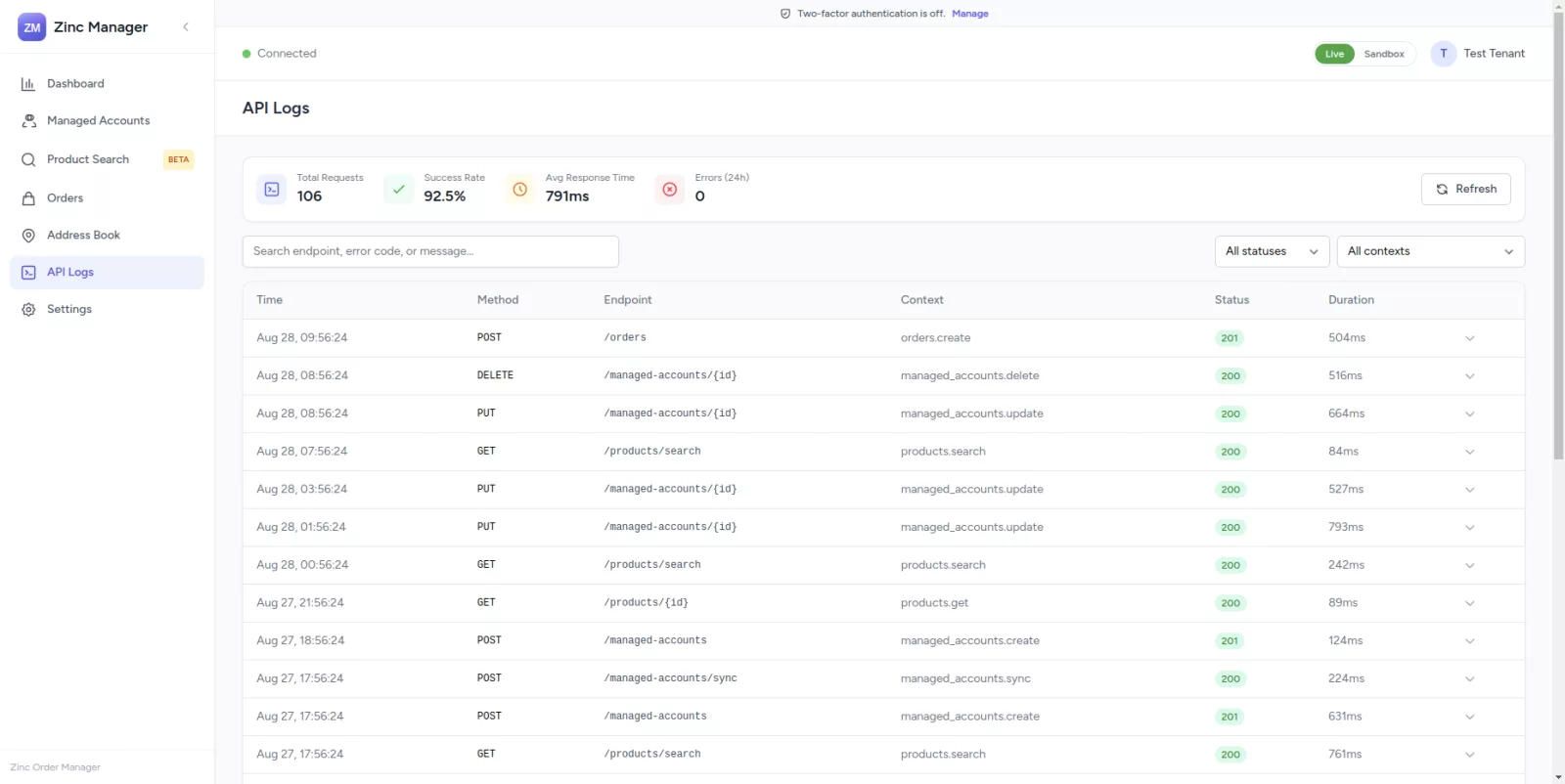
Start every day with a clear view of your operation.
The dashboard helps you immediately answer: what needs my attention?
Managed Accounts
128
112 active · 12 paused · 4 locked
Orders in Progress
14
across 6 retailers
Orders Placed Today
37
2 failed
API Calls Today
2,904
9 failures
Work confidently with Live and Sandbox environments.
Data never mixes between your Live and Sandbox environments.
Live
Production environment for real orders and real charges.
- • Its own API key
- • Its own webhook signing secret & URL
- • Its own accounts, orders, addresses & API logs
Sandbox
Safe environment for testing and development.
- • Its own API key
- • Its own webhook signing secret & URL
- • Its own accounts, orders, addresses & API logs
Simple configuration. Clear control.
Manage your Live and Sandbox API keys, webhook signing secret, and environment-specific webhook URL. Test your connection at any time and replace keys securely, secrets are never unnecessarily exposed in the interface.
Manage Your Settings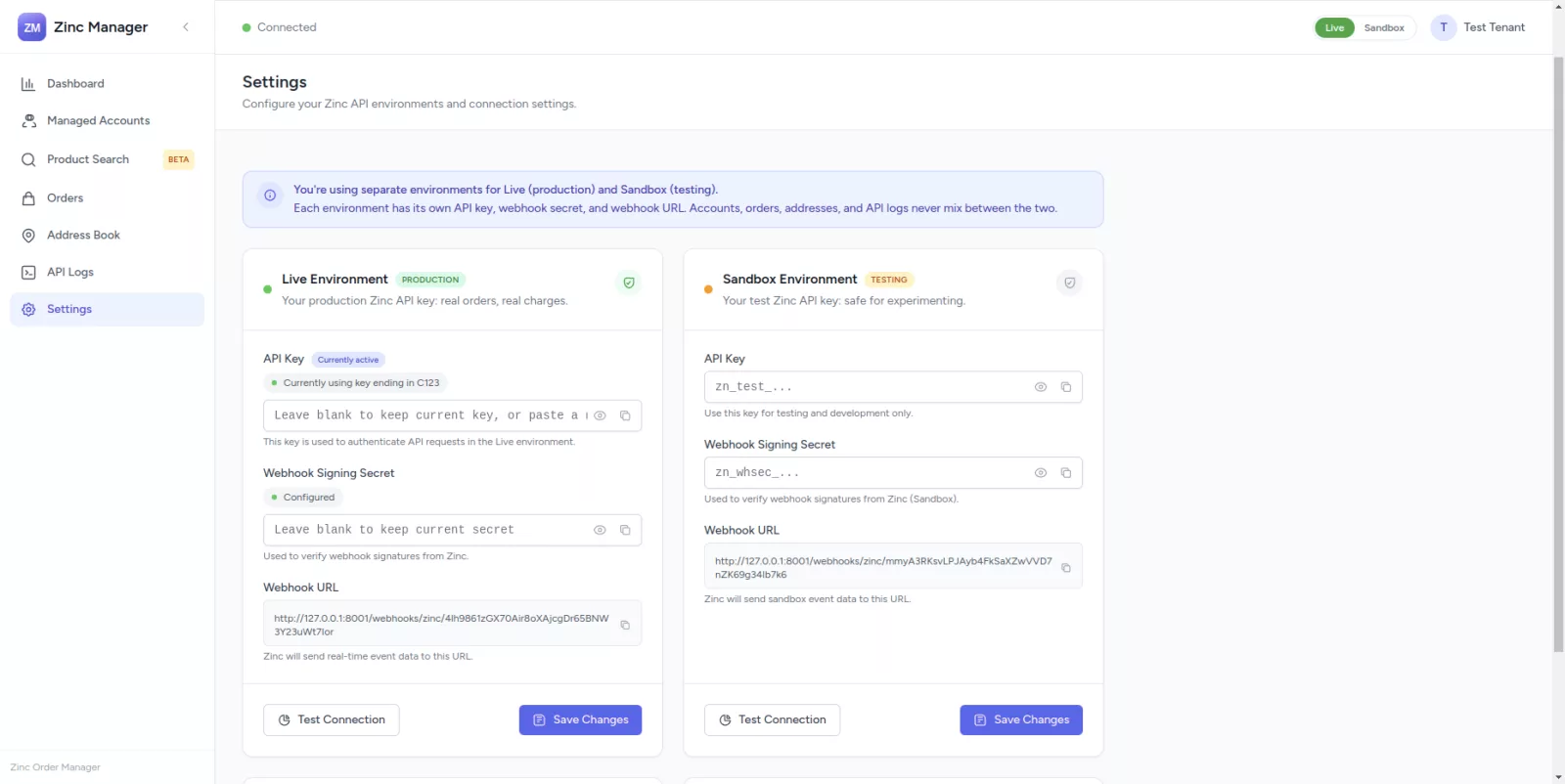
Every capability, built in.
Zinc Manager is free.
No plans, no seat fees, no upgrade prompts. Connect your own Zinc API credentials and manage every retailer account, order, and address at no cost.
Frequently asked questions
What is Zinc Manager?
Zinc Manager is a management platform that gives you one organized workspace for retailer accounts, orders, product search, addresses, and API activity, all powered by the Zinc API.
How does Zinc Manager work with Zinc?
Zinc provides the underlying commerce capabilities, placing orders on retailer sites. Zinc Manager sits on top of that, giving you a simple interface to manage and monitor it all.
Do I need my own Zinc API credentials?
Yes. You connect your own Live and Sandbox Zinc API keys, and your data stays fully isolated to your account.
What is the difference between Managed Accounts and Zinc-Pooled Accounts?
A Managed Account is a specific retailer account you connect and control. A Zinc-Pooled Account lets Zinc choose an available retailer account for you automatically.
Can I place an order on multiple accounts?
Yes. Enable bulk mode during order creation, select multiple accounts, and the same order will be created for each one you select.
What is the Sandbox environment?
Sandbox is a safe environment for testing your workflows without placing real orders or incurring real charges.
Are Live and Sandbox data separated?
Yes. Each environment maintains its own API key, webhook secret, webhook URL, accounts, orders, addresses, and API logs. Data never mixes between them.
Can I reuse saved addresses?
Yes. Save an address once in your Address Book and select it during any future order.
Can I search products across retailers?
Yes. Product Search lets you search and compare products from multiple retailers before moving into the order workflow.
What information can I see in API Logs?
You can see the request time, method, endpoint, context, status code, duration, and the full request and response payload for every API call.
Stop managing retailer operations across multiple tools.
Zinc Manager brings your accounts, orders, products, addresses, and API activity together in one simple, powerful workspace.